
👋 Hey there, I’m James. Each week, I write about building self driving software using AI. This newsletter was previously known as NoCode SaaS… given I’m now more focussed on AI than just NoCode tools it seemed like a good time to update the name!
Choosing which database to use for your app is one of the most important decisions when starting out on any new project. There are so many different things to think about from cost to capability and what the right option is for your project.
Over the years I’ve tried so many different options, from WordPress /MySQL sites back in the day through to nocode tools like Bubble which bundled in their own database. And even more recently tools like Airtable which made a database super visual and easy to work with by hand.
Today the landscape of which database to pick for your project has changed a lot - and indeed it’s often AI itself making the decision of which DB to use when you start something new.
Supabase reports that more than 60% of its new databases are launched by AI tools (not humans).
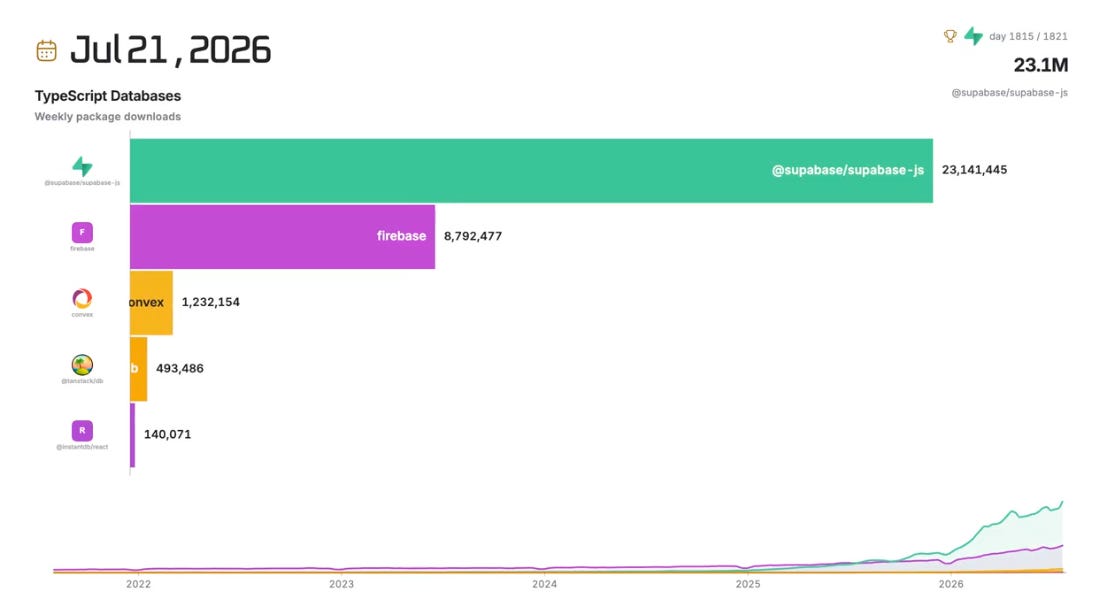
Supabase has had quite unbelievable growth over the last year or two, it’s effectively become the default option for building new apps. This chart from Agent Native shows how it’s totally overtaken Firebase and is far ahead of Convex in 3rd place (which is growing quickly now too!)
I’ve used Supabase on lots of projects myself and it is a fantastic tool. It was the main database powering the Create With Conference operating system I wrote about recently.
If you’re building your app using Claude Code or Codex, Supabase is likely the database it will recommend you to use. With a generous free tier, powerful MCP and simple web interface it’s often a great first choice for most apps. We managed to get away with using the free Supabase tier to power the Create With site for a long time!
But… there’s a new kid on the block. Convex.
If you’re anything like me, you’ve probably seen more and more social posts popping up about Convex, and why more and more people are choosing it to power their app over Supabase.

I decided to try it on some of my recent projects and have been so impressed with it it has become my new default when starting a new project. I thought it would be worth breaking down how it compares to Supabase, why I think it’s such a great choice for AI builders and when other options still make sense.
I’m not going to get too technical in my comparison as I’m coming at this from a user / builder perspective, rather than hardcore engineering.
Firstly, let’s start with what they have in common.
There are actually a lot of similarities between Supabase and Convex, their online dashboards look pretty similar with the familiar table views you’re used to.
You can see your list of tables doen the left and explore data in your database on the right.
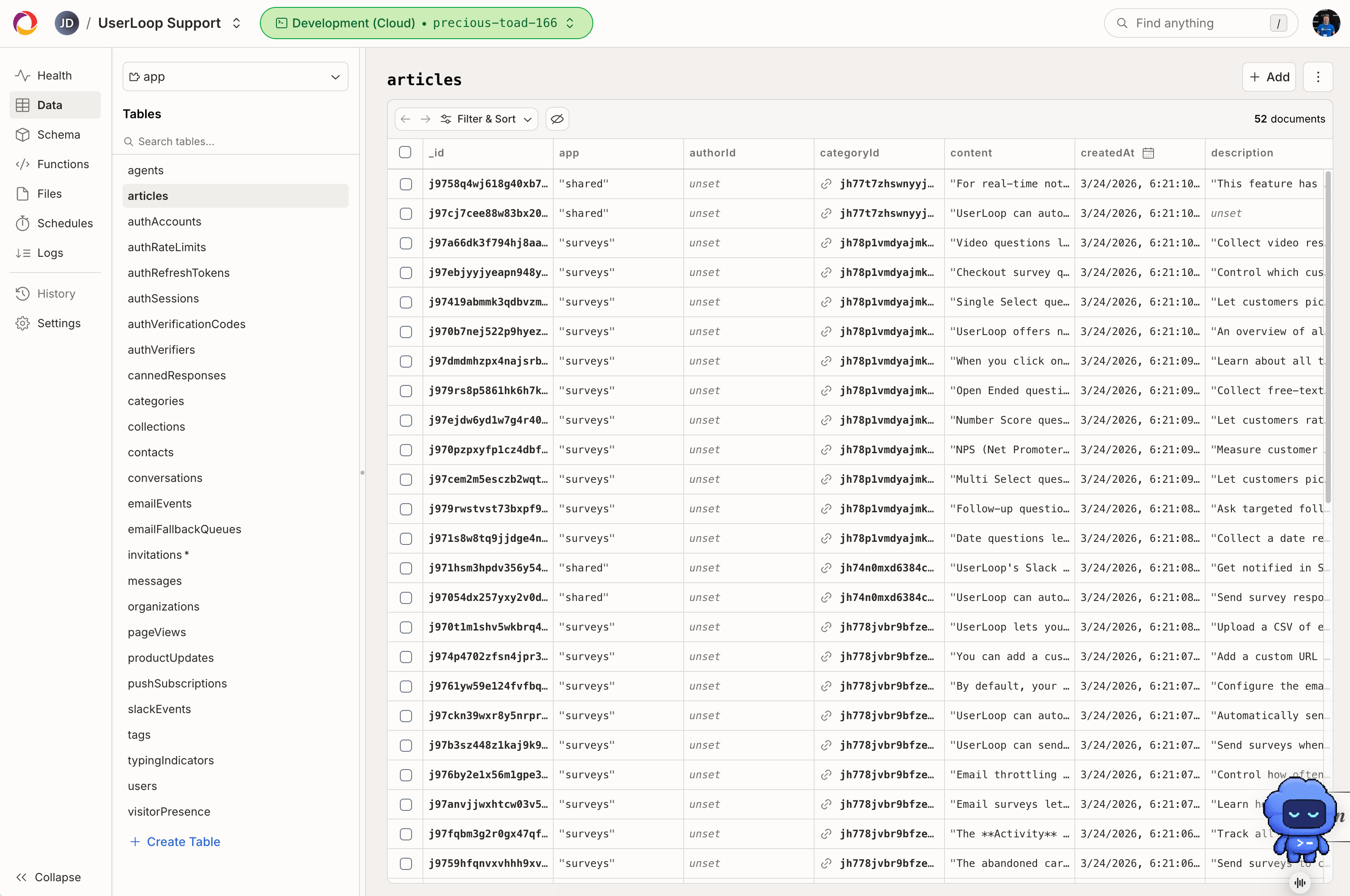
Functionally there are also a lot of overlaps, either of these tools can handle the majority of most app backends…
- Database
- Functions (basically running code in the cloud to complete tasks)
- File Storage
- Real time updates
- Auth
They both have really well supported ecosystems and community built plugins, Supabase is probably more mature here but Convex is catching up very quickly.
Both these databases are also an excellent choice if you’re building your app using AI, they both have excellent CLIs and MCPs which your agent can use to complete pretty much any action, though Convex does have an advantage here.
Why I am choosing Convex over Supabase
I still use Supabase on some of my more mature projects and love it, but I’m finding myself using Convex whenever I start something new now for a few reasons.
Works better with AI
This is the biggest reason I’ve switched for most new projects. AI coding tools are excellent at reading and writing code, but they struggle when the “source of truth” for your backend is spread across SQL schemas, security policies, dashboard settings and separate function files. Whilst Supabase can navigate this by pulling in data via the MCP, I’ve found the way Convex handles it works much better.
With Convex almost everything lives as TypeScript in your repo… the schema, the permissions, the backend logic and the real-time behaviour.
That single codebase makes it far easier for Claude, Codex or Cursor to understand the full picture and make consistent changes without breaking things.
End-to-end type checks also catch a lot of the hallucinations that would otherwise only show up at runtime.
Basically because the AI can see the entire structure of the database in the code itself, it’s able to work with it much more efficiently.
Versioning
In my opinion one of the weakest part of the experience of ‘vibe coding’ or building software with AI at the moment is how complicated versioning tends to be. When compared with a platform like Bubble which automatically handles multiple development versions of your app, it always seems to be a pain to spin up new versions of an app connected to a separate dev version of your database.
Whilst Supabase does have support for versions, it’s linked directly to Github and I’ve found it difficult to use in reality.
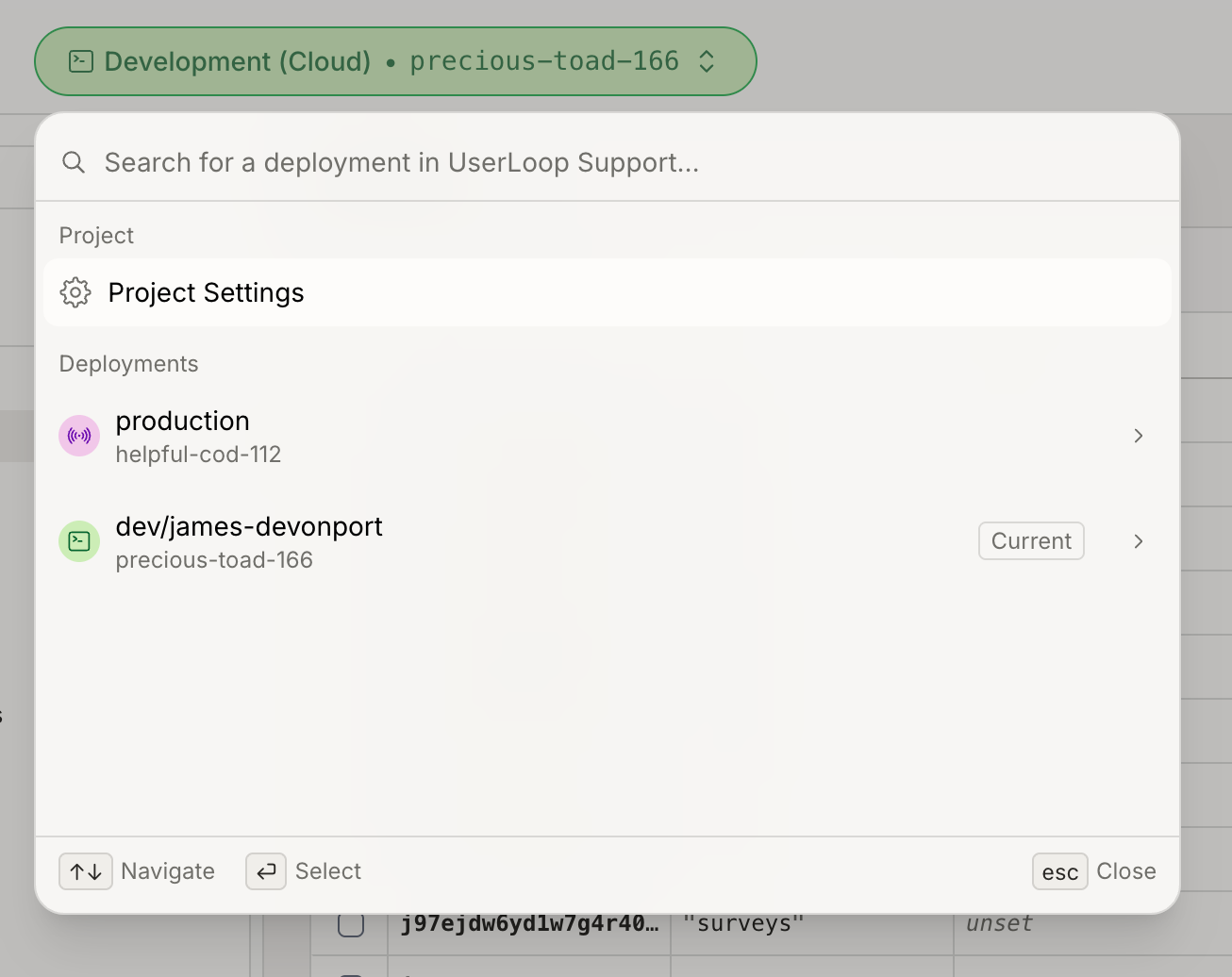
Convex makes versioning a big part of the UI on the web and automatically has both a development and production version, with it being super simple on how you switch between them.
For example, at the top of every screen in Convex is a switcher which you can easily toggle between versions, and as each version has it’s own name, it makes it easy and simple for your AI agent to switch between them for testing.
Pricing
Whilst both Supabase and Convex have super generous free tiers, there are some differences when you start moving to the paid tiers. And one thing in particular is a bit frustrating with how Supabase handles billing.
Supabase bills at the organisation level, but every project runs on its own dedicated instance. You get two free projects. Once you go Pro ($25/org) you get a $10 credit that covers roughly one small project, every extra project costs another ~$10+ per month in compute.
If you’re the kind of builder who spins up lots of side projects, experiments or staging environments, the bill climbs fast.
You can’t just upgrade a single project, it is a bit frustrating.
Convex works differently. The Professional plan is $25 per developer, and you can have many deployments under the same account.
Resource usage is at the team level rather than charged per database. The result is that people who constantly start new ideas (AI builders and tinkerers like me) are a lot better off with Convex.
Alex Finn put it simply: “When I was on Supabase my bill eventually exploded. So far with Convex my bill has been $20 no matter how many projects I spin up.” Others echo the same experience — the free tier is more generous for multiple small projects, and you don’t pay the “extra project tax” the same way.

So whilst I love both Supabase and Convex I urge you to have a play with trying out Convex on your next project, it may be the underdog but if you’re building using AI I think it’s worth checking out.
That’s it for this issue! You might notice the domain name for the app will change in the next issue as I switch off the nocodesaas.io branding and move everything to jamesdevonport.com
I’ll be covering lots more like this in future, in the next issue I’m planning to take a look at how I use Figma and Claude Code together to design apps before building them using the unofficial Figma Console MCP so stay tuned for that.
Until next time, happy building!
James.