

How I Built an Automated Ad Machine With Claude Code
I built a system that generates hundreds of targeted Meta ads with Gemini, uploads them automatically, and manages the whole campaign. Here's how you can too!

Hey there!
Welcome back to the NoCode SaaS newsletter, where I take you along on the ride of building a solo SaaS business without code using AI.
A few weeks ago I talked about the rise of the solo founder and how AI is making it possible for one person to build and run an entire software business.
But building is only half the battle. The other half is increasingly tricky - getting people to actually notice what you’ve built.
Marketing has always been the hardest part for us solo founders. You can build an amazing product but if nobody knows about it, none of that matters. And traditionally, running a proper paid ad campaign meant hiring designers, copywriters, and a media buyer. Or spending weeks learning it all yourself.
As we know, building software using AI is almost trivial now. We’re seeing thousands of new apps launch every week, the pace is quite astonishing.
But this means that more than ever, a focus on marketing is going to be super important if you’re going to get anyone to pay attention to what you’ve built.
This week I want to show you something that has completely changed our marketing strategy. I used Claude Code to build an entire Meta ads pipeline that generates hundreds of targeted ads, creates images with AI, and uploads everything directly to Meta.
I made a quick video to demo the system below to give you an idea of what it does…

For the Create With Conference we’re currently running around 250 different ads, way more than we’ve ever been able to make before.
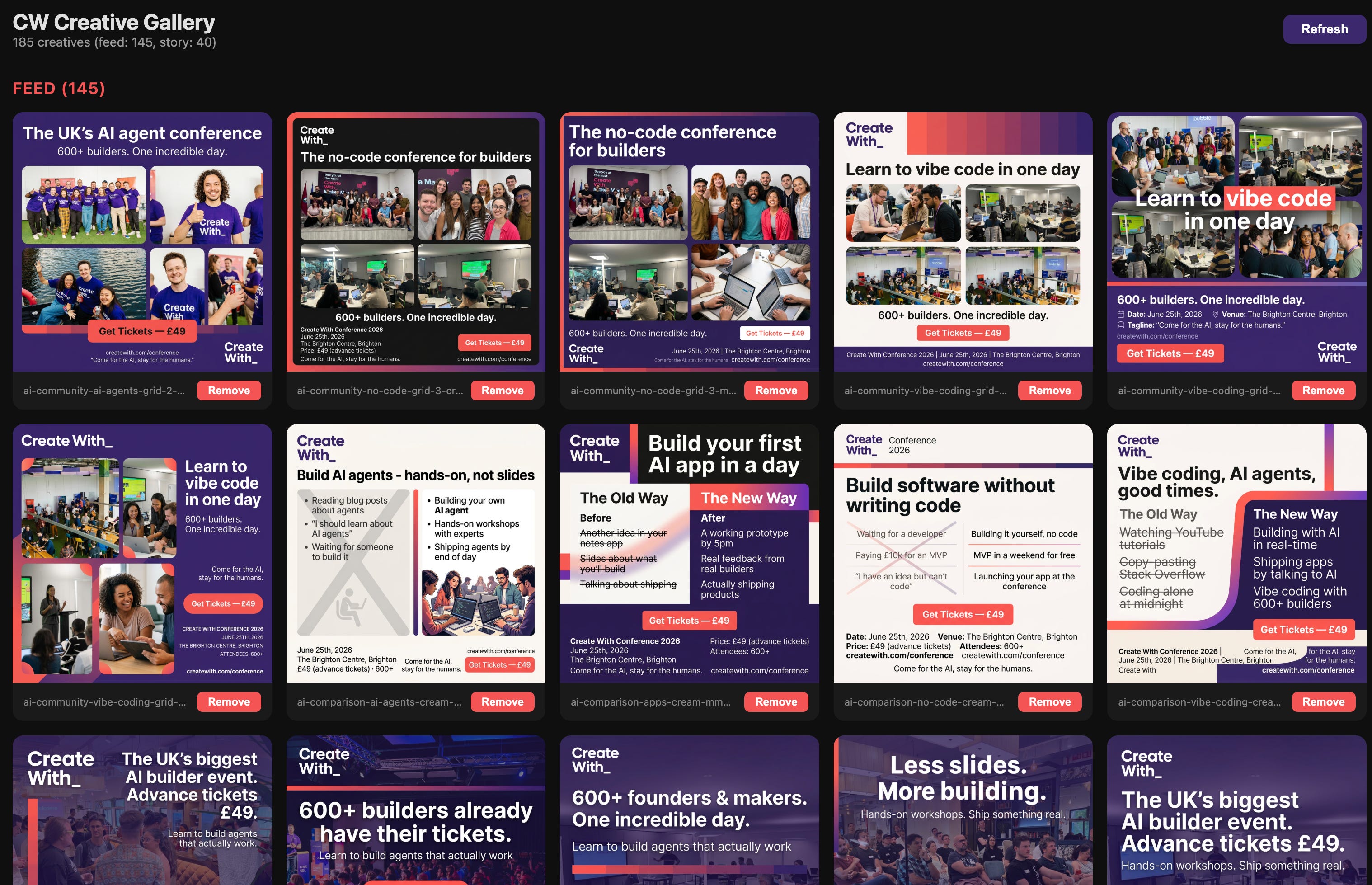
The interesting thing is that some of the ads that are now performing the best are ones I would never have come up with myself. Personas and angles I wouldn’t have considered.
That’s the real power of this approach. Being able to create so many different creatives gives Meta’s algorithms the chance to really experiment and discover which messages are actually getting customers interested. When previously we were only running a handful of fairly generic ads we wern’t learning much about what our audience actually wanted.
This is the first in a series of posts I’m planning on go-to-market (GTM) with AI.
We’ll be covering social media, Google Ads, X, TikTok, all orchestrated through Claude Code.
I’ve also been using Claude Code increasingly to handle other operational stuff. Like automatically generating and updating documentation for my apps.

I posted a tweet showing an example of this recently. It’s a small thing but it just shows how much of the day-to-day running of a business you can hand off to AI, manually updating documentation used to take me hours. Now Claude spins up a browser, uses the app, annotates the screenshots and updates my helpdesk for me! I’ll cover this in a future edition.
I’m going to be doing a live build of this ad machine on a Create With on Monday 16th March, you can register here, it’s free!
So lets get into building our automated Ads AI machine using Claude Code!
Before You Start
This is going to be a bit different to my usual tutorials. We’re going to be building a proper project with Claude Code. If this is your first time doing something like this, don’t worry.
The whole point is that Claude does the heavy lifting. You just need to describe what you want clearly (this is such an important skill now)
There are a few things you’ll need to set up first that will make following the tutorial much easier.
A Claude Pro subscription. You’ll need the $20/month plan or above to use Claude Code. I have 3 free guest passes to give away, so if you don’t currently have a subscription and would like a free week of Claude Code drop me a reply to this email and I’ll send over the link, first come first served!
A Meta developer account and API access. This is the bit that takes the most time to set up but it’s not difficult. You need to:
Go to developers.facebook.com and create an app. Choose “Other” as the use case and “Business” as the type.
Add the Marketing API product to your app.
Find your Ad Account ID. Go to your Meta Ads Manager, look in the URL bar, and you’ll see a number after
act=. That’s your Ad Account ID.Find your Business ID. Go to Meta Business Settings and grab it from the URL or the business info section, I just pasted in this entire URL to Claude and it picked out the info it needed.
Generate an access token. In your app dashboard, go to Marketing API > Tools, select all the
ads_managementandads_readpermissions, and generate a token. Important: these tokens expire after about 60 days so you’ll need to regenerate them occasionally.
A Google Gemini API key. We’re using Gemini to generate the ad images. Head to aistudio.google.com, sign in with your Google account, and generate an API key.
I’m going to recommend using the gemini-3.1-flash-image-preview model to generate the ads which you will need a bit of credit to use.
Node.js installed on your computer. You’ll need version 18 or newer. If you don’t have it, just search for “install Node.js” and follow the instructions for your operating system or ask Claude to do it for you, it should be able to handle everything.
Once you’ve got all of that sorted, you’re good to go!
How It Works
The system has three layers and it’s really quite a simple approach.
Layer 1: Your brand file. This is a single file that contains everything about your brand. Your colours, fonts, product name, screenshots, key messages, target audience. Everything. It’s the single source of truth that the whole system references.
Every ad it generates will be on-brand because it all pulls from this one file. You can chat back and forth with Claude to set this up, to start with I just told Claude my brand colours, logos and fonts and that was enough to get started.
You could also suggest Claude scrapes your marketing site and it could probably pick most of this up itself.
Layer 2: The creative matrix. This is where we work out what your ad angles and personas. If you already know what messaging you want to use you directly tell Claude what you’d like (the key messages or features you want to promote), your personas (the different types of people you want to reach), and your styles (the visual approaches for the ads).
If you’re not sure about how to build up the personas, just ask Claude what it recommends based on your brand.
Claude Code then generates every combination. So if you have 7 topics, 5 personas, and 4 styles, that’s 140 unique ads. Each one targeted to a specific person with a specific message in a specific visual style.
Layer 3: The upload pipeline. This handles talking to the Meta API. It takes your generated images, uploads them to Meta, creates the ad creatives with the right copy, and organises everything into campaigns and ad sets. The whole thing is automated.
Building It Step by Step
First of all don’t panic if you’re not technical! You don’t need to understand any of the code. You’re going to describe what you want to Claude Code and let it build everything for you, and then you’re just going to run it locally on your own machine.
I’ll give you the prompts I used at each stage.
I’m going to assume you’re starting in an empty project with no files, a blank slate.
Step 1: Set Up Your Project
Open Claude Code and start with this prompt:
“Create a new Node.js TypeScript project for generating Meta ads. Set up the project structure with folders for source code, generated images, and configuration. Install the dependencies we’ll need: the Google Generative AI SDK for image generation, dotenv for environment variables, and tsx for running TypeScript directly.”
Claude will create the project, set up the folder structure, and install everything you need.
It’ll also create a .env file where you’ll paste in your API keys, remember to keep these safe!
Go ahead and add your Gemini API key, Meta access token, Ad Account ID, and Business ID to that file.
You can then ask Claude to do a quick check to see if all the keys are working properly before proceeding.
Step 2: Create Your Brand File
This is the foundation of the whole system. Prompt Claude:
“Create a brand constants file that defines everything about my brand. I need sections for colours (primary, secondary, accent, background), fonts, my product/company name, tagline, key selling points, and target audience descriptions. Also define the ad formats we’ll be generating, like square for Instagram feed and portrait for Stories.”
Then customise it with your actual brand details, put your logo files etc into this folder. Tell Claude your colours, your product name, who your audience is. The more detail you put in here the better your ads will come out.
As I mentioned before, you could let Claude just crawl your marketing site if you like to populate this.
Step 3: Build the Creative Matrix
This is where you define what ads to generate. Prompt Claude:
“Create a creative matrix system. I want to define topics (key messages I want to promote), personas (different audience types I’m targeting), and visual styles for the ads. Then build a function that generates every combination of topic × persona × style. Each combination should include a description of the image to generate and the ad copy to use.”
For Create With, our topics included things like “AI is transforming how we build software” and “learn to build without code.”
My personas were indie hackers, product managers, career changers, startup founders, and agency owners.
And our styles ranged from bold typography to lifestyle photography to abstract tech visuals.
You can start small. Even 3 topics, 3 personas, and 2 styles gives you 18 unique ads. That’s already way more than most people run.
Step 4: Generate Your Ad Images
Now the fun bit. Prompt Claude:
“Build an image generation script that takes entries from the creative matrix, converts them into detailed prompts using our brand constants, and sends them to the Gemini API to generate images. Save each image as a PNG with a descriptive filename. Include a progress display so I can see what’s being generated.”
Claude will build a script that loops through your matrix, crafts a detailed prompt for each ad (including your brand colours, fonts, style requirements), sends it to Gemini, and saves the results.
You’ll end up with a folder full of AI-generated ad images, all on-brand.
One tip here. Gemini is really good at generating ads but you want to be specific in your brand spec about things like “no text in the image” or “always include the brand colours prominently.” The more specific you are, the better the results.
Step 5: Review Your Ads
You’re going to have loads of images now and not all of them will be great. Prompt Claude:
“Build a simple local gallery web page that shows all the generated images in a grid. Include a delete button on each one so I can quickly remove any ads I don’t want to use. Group them by topic and persona so I can see the full range.”
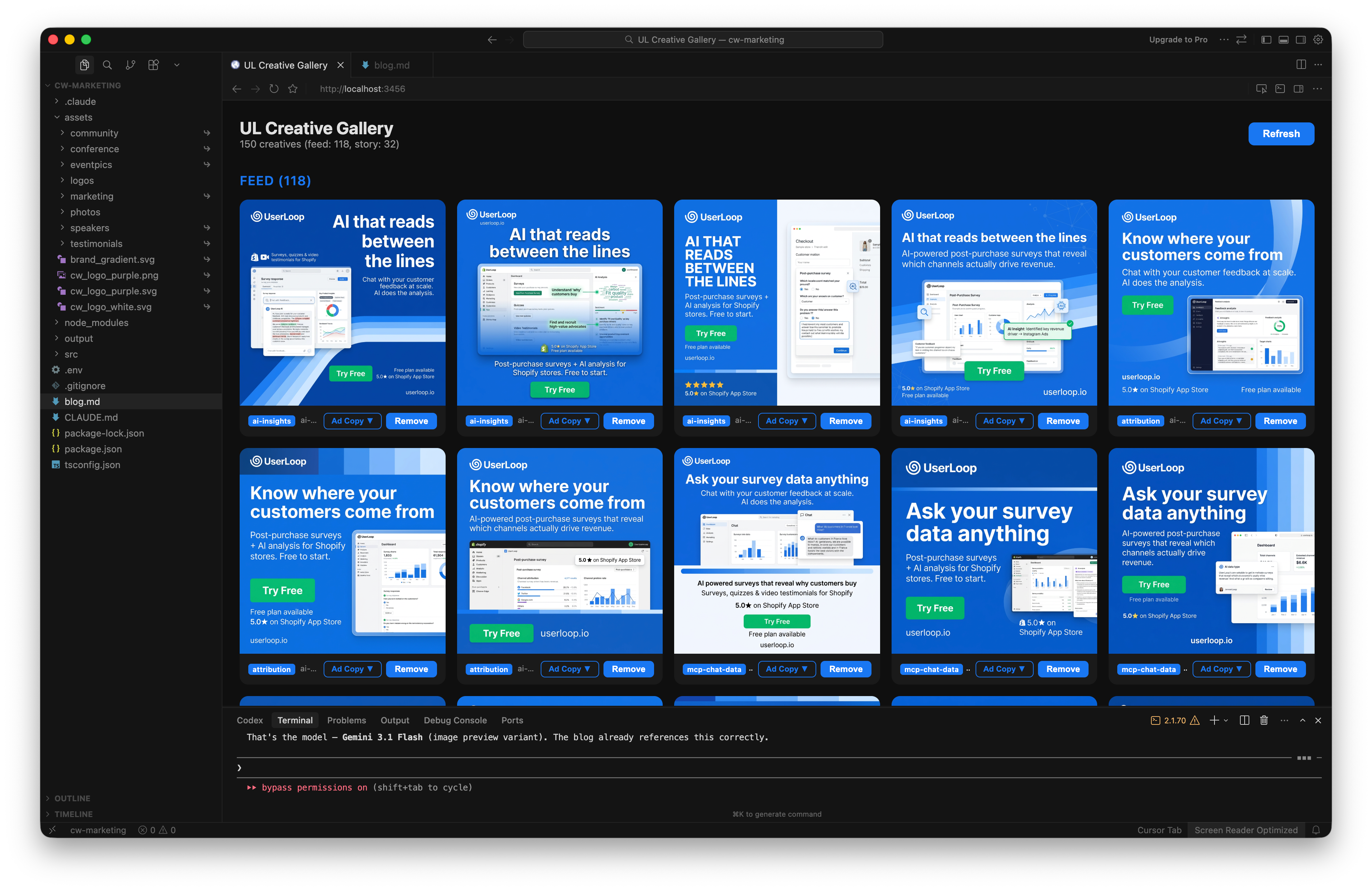
Claude will spin up a little local web server with a gallery page.
You open it in your browser, scroll through all your ads, and delete the ones that aren’t up to scratch. I usually keep about 70 to 80% of what Gemini generates. The quality is genuinely impressive with this latest model.
Step 6: Upload to Meta
This is the bit that saves you the most time. Prompt Claude:
“Build a Meta Ads upload pipeline using the Graph API v21.0. It should upload each image to my ad account, create ad creatives with rotating copy from our brand file, then organise everything into a campaign with ad sets grouped by persona. Use Campaign Budget Optimization so Meta can automatically shift budget to the best performing ads. Enable Advantage+ creative optimizations.”
Claude will build the entire upload pipeline. It creates the campaign, sets up ad sets for each persona group, uploads all your images, attaches the copy, and sets the targeting. You’ll also need to say what kind of campaign you’d like, eg send traffic to our landing page https://createwith.com/conference.
You tell it your daily budget and it handles the rest.
And there’s rate limiting so Claude will need to add small delays between API calls. But honestly, Claude Code handles all of this really well, it can take a bit of time if you have hundreds of ads as it will need to space out it’s requests to the Meta API.
Step 7: Monitor Performance
Once your ads are running, you want to know what’s working. Prompt Claude:
“Build a performance monitoring script that pulls daily stats from the Meta API for my campaign. Show me impressions, clicks, click-through rate, cost per click, and spend for each ad. Sort by best performing so I can see what’s working.”
This gives you a nice daily report you can run from the command line, this really impressed me.
As I mentioned earlier, the ads that are performing best for Create With are ones I would never have created manually. Different angles, different personas, different visual approaches.
The matrix approach means you’re testing so many more variations than a human (well a solo founder anyway!) would ever bother to create. And Meta’s algorithm is really good at figuring out which ones resonate.
The Results
We’re currently running about 200 ads for Create With Conference through this system. The whole thing was built in a weekend.
Previously this kind of campaign would have required a designer, a copywriter, and someone managing the Meta Ads account. Now it’s just me and Claude Code.
The most surprising result has been discovering which ads actually convert. I had assumptions about what messaging would work and which personas would respond. I was wrong about a lot of it.
The matrix approach surfaces winning combinations you’d never think to try.
What’s Coming Next
This is just the beginning of a series on go-to-market with AI.
In the next few editions I’m going to cover using the same matrix approach for social media content generation, expanding to Google Ads, X, and TikTok using the same pipeline, and building a unified marketing dashboard that monitors everything in one place.
The vision is a solo founder running a full-scale marketing operation across every major channel, all orchestrated through Claude Code.
A marketing team of AI agents!
Create With Conference 2026
If any of this stuff excites you, Create With Conference on June 25th in Brighton this year is for you. Live coding with AI, building and marketing as a solo founder, and the future of no-code and AI. It’s going to be brilliant and I’d love to see you there.
That’s it for this week! If you try building your own ad pipeline I’d love to hear how it goes. Just hit reply and let me know.
Happy building!
James
P.S. Advance tickets for Create With Conference are still available at https://luma.com/createwith26. Grab yours before they’re gone!
This is amazing man, its only showing up on my substack feed in May.
Amazing that you built it all over a weekend!
Are you still going to the do the dashboard build?
Thanks for the article I saved it for later. I appreciate you taking the time and sharing this information.